

uTorrent 3.6.0
uTorrent is a lightweight, fast BitTorrent client for Windows, Mac, and Android that's been a go-to for millions thanks to its simple interface, batch downloads, scheduling, RSS auto-downloads, and remote access from any device. The free version works fine but includes ads and bundled offers, and it's been flagged by multiple antivirus vendors as a PUA due to past adware and cryptocurrency mining incidents. Pro costs $19.95/year and removes ads while adding antivirus scanning. It's still reliable for casual use, but if privacy and clean software matter to you, qBittorrent is the better choice in 2026.
- Freemium
- Windows
- macOS
- Linux
- Nov 4, 2026
Screenshots
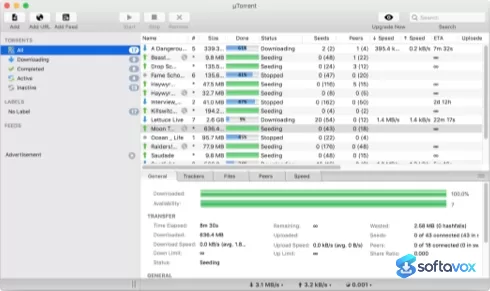
About uTorrent
uTorrent Download | Lightweight Torrent Client, But Read This First
TL;DR Quick Take / Who is this for?
uTorrent (µTorrent) is the torrent client that defined the category for a generation, and its core strength has not changed: it is an extremely small, fast, and feature-rich BitTorrent client that runs on almost any Windows machine without taxing system resources. The installer is roughly 3.2 MB, the interface created the template that other clients still copy, and the free version includes scheduling, bandwidth controls, RSS support, and remote access through the Android app[reference:0][reference:1]. But the modern uTorrent is a different product from the one long-time users remember. The free version is ad-supported, the installer bundles third-party software, and the client has been flagged by security tools for its installer behaviour[reference:2][reference:3]. The paid Pro tier ($19.95 per year) removes ads and adds antivirus scanning and a media player, but the core torrent engine has not kept pace with open-source rivals. The user verdict is brutal: Trustpilot rates uTorrent at 1.3 out of 5, and Reddit and security communities routinely describe it as “corporate spyware” and urge users to switch to qBittorrent[reference:4][reference:5]. uTorrent is the right pick only for users who specifically want the classic uTorrent workflow and are prepared to decline every bundled offer during installation. For almost everyone else, qBittorrent or Transmission are safer, cleaner, and free of the monetisation baggage.
Quick Info Box
| License Type | Freemium (Free ad-supported; Pro $19.95/year) |
|---|---|
| File Size | Approx. 3.2 MB (Windows installer) |
| OS Compatibility | Windows 7/8/10/11, macOS, Android, Linux (Web) |
| Latest Version | 3.6.0.47254 (Windows Classic) |
| Developer | Rainberry, Inc. (BitTorrent, Inc.) |
Key Features & Real-World Usability
uTorrent’s core engine is still competent at the basics. It handles multiple simultaneous downloads, lets you schedule bandwidth usage, supports global and per-torrent speed limits, and resumes interrupted transfers quickly[reference:6]. The uTP protocol and NAT traversal help improve connectivity through routers and firewalls, and the client supports trackerless torrents through Mainline DHT[reference:7]. The interface is minimal and responsive on older hardware, which is the main reason the client earned its reputation in the first place. The paid Pro tier adds features the free version lacks: built-in antivirus scanning of downloaded torrents, an integrated HD media player for playing files while they download, and file conversion for playback on other devices[reference:8]. Pro costs $19.95 per year, and a Pro+VPN bundle includes a one-year CyberGhost VPN subscription for up to five devices[reference:9]. The limitations are significant and have accumulated over time. The free version displays ads, and the installer bundles additional software unless you actively decline it[reference:10][reference:11]. There is no torrent streaming and no sequential downloading on the free tier, and the paid features have been described in independent reviews as barely functional[reference:12]. The client lacks BitTorrent v2 support, which newer clients like qBittorrent and Transmission already include, and it offers no I2P support for anonymous torrenting[reference:13]. Customer support is also repeatedly described as poor, which matters more when the installer requires careful attention to avoid unwanted software[reference:14].
- Extremely small footprint: A roughly 3.2 MB installer and a lightweight runtime make uTorrent practical on older or low-spec Windows machines[reference:15].
- Bandwidth scheduling and speed limits: Configure time-based bandwidth schedules and set global or per-torrent speed caps to avoid saturating your connection[reference:16].
- RSS downloading and remote access: Automate torrent downloads via RSS feeds and manage transfers remotely through the Android app or web interface[reference:17].
- uTP and NAT traversal: The uTP protocol and NAT hole-punching improve peer connectivity and download speeds through routers and firewalls[reference:18].
- Pro antivirus scanning (paid): The Pro tier scans downloaded torrents with an antivirus engine before you open them, adding a layer of protection the free version lacks[reference:19].
- Integrated media player and conversion (paid): Pro includes an HD media player for streaming files while they download and a converter for playing content on mobile devices[reference:20].
- Pro+VPN bundle (paid): The Pro+VPN subscription includes a one-year CyberGhost VPN for up to five devices, bundling privacy with the torrent client[reference:21].
Pros, Cons & Community/User Feedback
User sentiment around uTorrent is overwhelmingly negative, and the complaints are consistent across platforms. On Trustpilot, the client holds a 1.3 out of 5 rating, with reviewers citing a “huge drop in download speed,” an interface that “works terribly slow” during downloads, and files being accidentally deleted or redownloaded because of confusing UI behaviour[reference:22]. A recurring theme in Trustpilot reviews is bundled software: one reviewer reported that after installing uTorrent, two “antivirus applications” appeared on their PC, and when they deleted both, more appeared[reference:23]. Another long-term user who had relied on uTorrent for 15 years described the current version as cluttered with “annoying programs” and flashing popups, calling it a “shame” compared with the older builds[reference:24]. WOT community reviews echo this: the download is described as “nagware,” the installation is “bundled with bloatware,” and the application itself contains ads[reference:25]. One reviewer noted that the installer tried to load “all sorts of unwanted programs” and warned that the design intends for users to miss the opt-out checkboxes[reference:26]. Reddit and federated social platforms are even more direct. A widely shared post describes uTorrent as “corporate spyware” that gathers data without consent, and commenters state flatly that “uTorrent has been malware for over 10 years” and urge users to switch to qBittorrent, which has no ads and gathers no data[reference:27]. Security analysis reinforces those concerns. Automated malware analysis of the uTorrent installer has flagged “PUABundler:Win32/uTorrent_BundleInstaller” and “OfferCore” unwanted-program behaviour, and antivirus tools have detected the installer as a potentially unwanted program with credential-access indicators[reference:28][reference:29]. The client also has a history: it briefly bundled a cryptocurrency miner in 2015, a decision that caused lasting reputational damage[reference:30]. The positive sentiment that exists is mostly nostalgic. Reviewers acknowledge that the core torrent engine is lightweight and that the interface is familiar, but even those comments are usually followed by a recommendation to use an open-source alternative instead.
Pros
- Exceptionally small installer and lightweight runtime suitable for older hardware
- Familiar, minimalist interface that established the modern torrent client layout
- Bandwidth scheduling and per-torrent speed limits are included in the free version
- RSS downloading and remote access via the Android app add automation and convenience
- Pro tier removes ads and adds antivirus scanning and an integrated media player
- Pro+VPN bundle includes a CyberGhost VPN subscription for up to five devices
Cons
- Free version is ad-supported, and the installer bundles third-party software unless declined manually
- Security tools flag the installer as a potentially unwanted program with bundle-installer behaviour
- Trustpilot rating of 1.3 out of 5, with complaints about speed drops, interface lag, and bundled antivirus apps
- Past incident involving a bundled cryptocurrency miner caused lasting reputational damage
- No BitTorrent v2 support and no I2P support, lagging behind open-source alternatives
- Pro features like torrent streaming and file conversion are widely described as barely functional
- Customer support is consistently criticised as poor
- Open-source alternatives like qBittorrent offer more features with no ads, no bundles, and no data collection
Final Verdict & Safe Download Advice
uTorrent is a client that has been overtaken by its own monetisation strategy. The core torrent engine is still small and fast, and the free version includes enough scheduling and bandwidth controls to satisfy basic users. But the installer bundles unwanted software, the free client displays ads, the Pro tier’s headline features are poorly executed, and the security community has documented installer behaviour that antivirus tools classify as potentially unwanted. The user verdict on Trustpilot (1.3 out of 5) and across Reddit and WOT is not an anomaly; it reflects a consistent experience of bloatware, ads, and declining trust. If you specifically need the classic uTorrent interface and you are prepared to decline every bundled offer during installation, the client will still download torrents. But for almost everyone else, the honest recommendation is to skip uTorrent entirely and use qBittorrent, which is free, open source, ad-free, and supports BitTorrent v2 and modern security features that uTorrent lacks. If you are installing uTorrent on a machine that less technical users will operate, the risk of accidentally accepting bundled software is high enough that a cleaner alternative is the safer choice.
- Download only from utorrent.com, and read every installer screen: The official installer is the only legitimate source, but it is also the vector for bundled offers. Use the custom or advanced installation option rather than the “recommended” express install, and deselect every pre-checked offer for antivirus trials, browser toolbars, or “optimisation” tools.
- Verify the installer size and version: The Windows Classic installer is approximately 3.2 MB, and the current stable build is 3.6.0.47254. A dramatically larger file, such as the multi-gigabyte “full working installer” packages circulating on GitHub, is not the legitimate uTorrent client and should be treated as malware[reference:31].
- Scan the installer before running it: Automated analysis has flagged the uTorrent installer as a bundle installer with potentially unwanted program behaviour. If your antivirus flags it, do not override the warning without understanding exactly what it detected[reference:32].
- Avoid “cracked” or “Pro full version” downloads: The Pro features are not worth the risk of running a repacked installer. Cracked builds of uTorrent and other torrent clients are a common malware vector, and the official Pro subscription is inexpensive at $19.95 per year[reference:33].
- Consider an open-source alternative before installing: qBittorrent offers a comparable feature set, no ads, no bundled software, and active development with BitTorrent v2 support. If you have no specific reason to need uTorrent’s interface, the safer choice is to skip it entirely[reference:34][reference:35].
- Monitor what gets installed: After installation, check Windows’ installed-programs list for unfamiliar entries. If unwanted software was installed despite your precautions, remove it immediately and consider switching clients rather than repeating the installation process.
See all File Sharing programs (1) ›
Key features
- Classic minimalist interface, familiar uTorrent workflow and layout
- Multiple simultaneous downloads, quick resume for interrupted transfers
- Bandwidth scheduling and speed limits, global and per-torrent caps; time-based schedules
- RSS downloading, automate torrent downloads via RSS feeds
- Remote access, manage transfers via Android app or web interface
- uTP and NAT traversal, improves peer connectivity through routers/firewalls
- Mainline DHT support, trackerless torrents supported
- Pro tier ($19.95/year), removes ads, adds antivirus scanning, HD media player, and file conversion
- Pro+VPN bundle, includes one-year CyberGhost VPN for up to five devices
- Current Windows Classic version, 3.6.0.47254
- Platforms, Windows 7/8/10/11, macOS, Android, Linux (Web)
Frequently asked questions about uTorrent
Is uTorrent safe to use?
Is uTorrent free?
What is uTorrent used for?
Why does my antivirus flag uTorrent?
How do I uninstall uTorrent?
What's the difference between uTorrent and qBittorrent?
What’s new in uTorrent 3.6.0
Chromium Edge WebView Support: The client now uses an embedded Chromium Edge WebView for its interface.
Swarm Health Enhancements: Updates were made to improve torrent swarm health and make more peers and seeds available.
Stability & Bandwidth: There have been improvements to download queue stability and bandwidth management controls.
Magnet Link Handling: Better handling of magnet links.
Versions
| Version | Release date | Platform | File size | |
|---|---|---|---|---|
| uTorrent 3.6.0 Latest version | Oct 29, 2025 | Windows | 4.1 MB | Download |
Comments about uTorrent
No comments yet. Share your experience with this program!